AI in technical writing: comprehensive guide for documentation professionals
15/01/2026
Artificial intelligence is fundamentally changing how technical documentation gets created, managed, and delivered. Technical writers who once spent weeks updating documentation sets can often complete the same work in days. Teams that struggled with consistency across thousands of pages can now enforce standards more systematically. Organisations that used to run separate localisation projects for each language are increasingly using AI to accelerate multilingual documentation (with human review still essential).
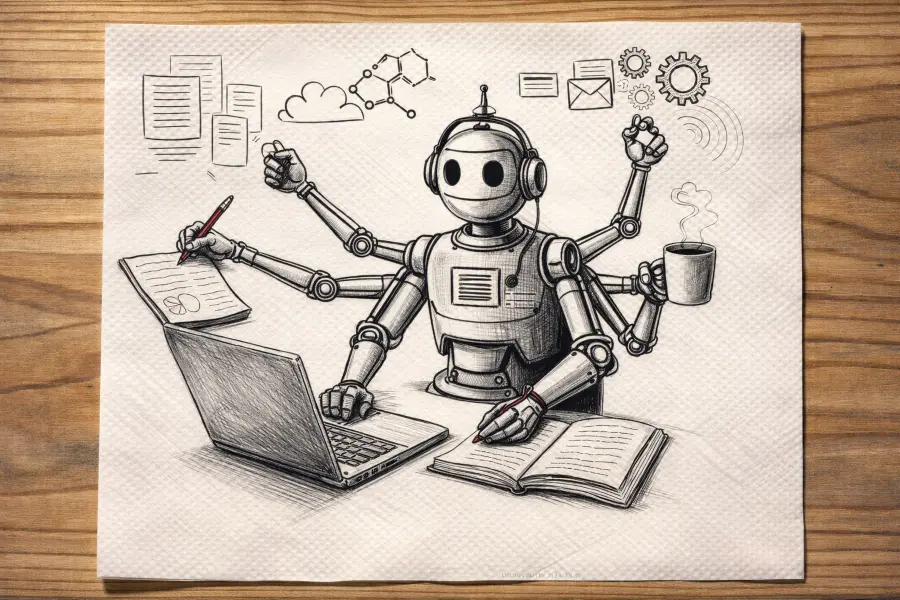
This shift isn't theoretical. According to Cherryleaf's 2025 "Using AI in TechComm" survey, 55% of technical communicators use AI on a regular or semi-regular basis. A broader survey of writing professionals by Gotham Ghostwriters found that 61% use AI tools at least sometimes, with 26% using them daily. (That broader survey covers writing professionals across multiple fields - not just technical writers - but it shows how widespread AI adoption has become.)
The question for most technical writers has shifted from "should we use AI?" to "how do we use it effectively?" This guide covers practical applications of AI in technical documentation, expert perspectives from the field, workflows you can implement, and prompts you can reuse.
Key takeaways
- ✓ AI is most effective when it transforms trusted inputs (specs, tickets, Subject Matter Expert (SME) interviews, OpenAPI, UI labels and in some cases suppliers' documentation) into structured drafts, not when it invents.
- ✓ The biggest risks are plausible inaccuracies, confidentiality mistakes, and "generic" output that doesn't match your product.
- ✓ Successful teams combine AI speed with rigorous validation, style/terminology enforcement, and clear governance.
- ✓ The technical writer role is shifting upward toward information architecture, context curation, and quality systems.
Table of contents
Understanding AI's role in technical documentation
Core AI capabilities for technical writers
How AI documentation differs from general AI writing tools
Technical writing workflows for AI tools
Effective prompting for technical documentation
Limitations and considerations
Data handling and confidentiality in AI workflows
AI documentation tools and software platforms
AI for API documentation and software documentation
The evolving role and essential skills for technical writers
Quality, governance, and validation in AI documentation
Workflow automation around AI: opportunities and limits
Looking ahead: emerging trends in AI technical communication
A practical AI documentation workflow you can implement
Reusable technical writing prompts
Frequently asked questions
Resources for technical writers using AI
Conclusion
Understanding AI's role in technical documentation
AI documentation tools represent a significant evolution from traditional technical writing software. While word processors and content management systems help organise and publish documentation, modern AI tools can participate in the writing process itself: proposing drafts, improving clarity, checking consistency, and adapting content for different audiences and formats.
In practice, AI is best treated as an accelerator:
- It speeds up drafting, restructuring, and standardisation.
- Humans remain accountable for correctness, completeness, user empathy, and product truth.
Core AI capabilities for technical writers
Current AI tools for technical writing typically provide these capabilities:
Content generation and assistance
AI can draft initial versions of documentation from source materials like code repositories, API specifications, tickets, and product requirements. Tom Johnson (I'd Rather Be Writing) has described AI as getting him most of the way through a topic when he supplies strong source inputs, often paraphrased as "80% of the way."
Content analysis and optimisation
Beyond generation, AI excels at content analysis and optimisation. These systems can scan documentation for readability issues, terminology inconsistencies, and structural problems like missing prerequisites or unclear outcomes. They can identify duplicated or contradictory guidance across large documentation sets, the kind of consistency checking that becomes impractical for humans when documentation spans thousands of pages. AI can also compare documentation against current code or product specifications to identify outdated content, helping teams maintain accuracy as products evolve.
Translation and localisation support
Translation and localisation support has emerged as another high-value application. Modern AI documentation tools can significantly accelerate translation workflows and reduce cycle time, though human review remains essential for domain-specific terminology, compliance language, compliance with standards, and cultural fit and clarity. The combination of AI speed with human expertise in localisation produces better results than either alone.
Context-aware suggestions
With large context windows and retrieval over internal knowledge bases, AI can produce more relevant outputs, especially when it has access to product context, style guidance, and approved terminology. Keep expectations realistic: better context improves relevance, but does not replace verification.
How AI documentation differs from general AI writing tools
AI technical writing requires different standards than general content writing. Technical documentation demands:
- Precision and reproducibility
- Topic-based authoring and modular content structure
- Consistent terminology and cross-references
- Adherence to safety and compliance constraints (where relevant)
- Alignment with product behaviour and UI reality
General AI writing tools may produce readable text but can miss key technical distinctions, invent details, or create generic explanations that don't match the product. Specialised AI documentation approaches (and good governance) reduce those risks by grounding AI output in authoritative sources.
Technical writing workflows for AI tools
Large Language Models (LLMs), like for example ChatGPT, are popular for technical writing because it's accessible and versatile. Used well, it can support workflows like:
Initial draft generation: Generate a first draft from specs, suppliers' documentation, SME interviews, tickets, or code snippets, then validate and rewrite for accuracy and usability.
Documentation restructuring: Reorganise existing documentation for a new audience (e.g., developer-focused → end-user guide), while retaining technical correctness.
API documentation drafting: Create consistent, structured endpoint descriptions from OpenAPI + engineering notes. Then test examples and verify behaviour.
Release notes and changelogs: Johnson has described a workflow of using diffs/updates to draft release notes, then refining for user impact and clarity.
Effective prompting for technical documentation
Prompt quality matters, but input quality is even more important. The best results come when you provide clear context, constraints, and structure.
Lance Cummings (Cyborgs Writing) emphasises that models reflect patterns they learned from human documents: clear headings, logical flow, and structured organisation. One useful framing from his writing is that the goal is output that's "organised for clarity," so it makes sense to both a colleague and an AI.
Research and practitioner experience consistently show that well-structured prompts yield better outputs than vague prompts, especially when you include source materials and explicit formatting requirements.
Effective technical writing prompts usually include:
- The doc type (API reference, user guide, troubleshooting article)
- The target audience (developers, admins, end users)
- Required technical depth and terminology level
- Structure requirements (headings/sections, tables, warnings)
- Source material or context (the "source of truth")
- An instruction to flag uncertainties (e.g., "NEEDS VERIFICATION")
Tom Johnson also predicts that tech writers will be especially effective at this kind of structured prompting because it resembles what tech writers already do: define constraints, shape structure, and optimise for the reader. For those interested to go into more detail, we wrote a blog post about four prompting techniques every technical writer should master.
Limitations and considerations
AI-assisted documentation is powerful, but it has hard limits.
Fabrizio Ferri-Benedetti's practical reminder is that an LLM is a tool, not a teammate. If a session becomes messy or starts drifting, it can be more effective to restart from a clean prompt than to keep patching a confused thread.
Critical limitations include:
- Plausible but incorrect technical information ("confident wrongness")
- No direct access to proprietary systems unless you provide controlled access
- Inability to verify product behaviour on its own
- Generic output that misses product-specific nuance
- Incomplete application of organisational style guides, unless you provide them clearly
Bottom line: AI provides acceleration, not replacement. Human review and validation remain mandatory for technical documentation.
Data handling and confidentiality in AI workflows
Ellis Pratt shares practical privacy risks and mitigations for technical writers using AI tools in a Cherryleaf podcast episode on privacy and AI.
- Don't paste proprietary code or customer data into public tools. Use approved enterprise tooling, a secure environment, or redact sensitive information.
- Understand your tool's data handling. Know what gets stored, logged, retained, or used for training, and who can access prompts/outputs.
- Treat outputs as drafts. Validate against your source of truth: product behaviour, code, or specs.
- Follow your organisation's AI policy. If you don't have one, treat that as a documentation governance gap and escalate it.
AI documentation tools and software platforms
Beyond general-purpose AI like ChatGPT, many teams use a mix of tools mapped to specific documentation jobs.
Categories and evaluation of AI tools for technical writing
Drafting and rewriting: General LLM interfaces or editor-integrated assistants for outlines, drafts, rewrites, and summaries.
Code and API support: Tools that generate or update reference docs from OpenAPI/Swagger, code signatures, or docstrings.
Consistency enforcement: Traditional linters (e.g., Vale) plus AI-driven consistency checks across large doc sets.
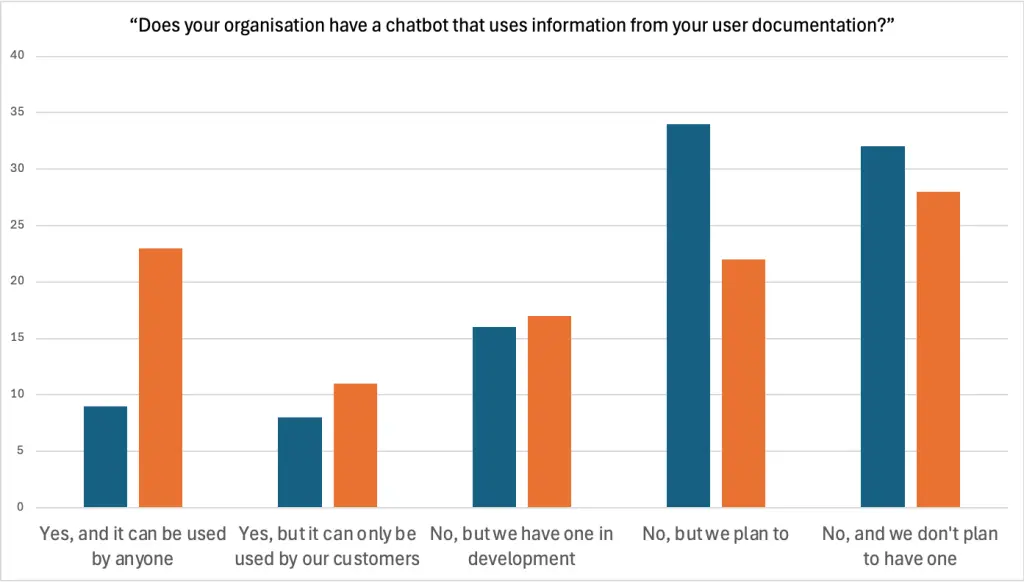
Knowledge retrieval (RAG): Tools that answer questions using your docs as the retrieval layer (instead of "making it up").
Localisation: AI translation, terminology management, and human review.
When evaluating AI documentation software, assess:
- Security and compliance model (especially for internal docs)
- Integration capabilities (CMS, docs-as-code, Git, issue trackers)
- Export and format support (Markdown, HTML, DITA, etc.)
- Citations and traceability (can it show where claims come from?)
- Cost predictability and scalability
- Vendor commitment to technical documentation use cases
AI for API documentation and software documentation
API documentation and software documentation are especially well-suited to AI support because they often have structured inputs and a close relationship to the source of truth.
AI API documentation generators
These tools can:
- Draft endpoint/method descriptions from code/specs
- Standardise parameter tables and error sections
- Propose request/response examples (still must be tested)
- Keep formatting consistent across large API surfaces
- Update reference docs as specs change
AI can handle repetitive structure; writers add nuance: use cases, conceptual guidance, pitfalls, and verified examples.
AI for software documentation maintenance
AI can help by:
- Detecting drift (UI label changes, outdated steps)
- Suggesting updates based on changes
- Maintaining cross-references when content moves
- Enforcing consistency across multi-writer doc sets
Automated technical documentation workflows
In CI/CD-style setups, automation can:
- Regenerate reference docs
- Flag docs that likely need review after code changes
- Run quality checks
- Draft release notes from structured change inputs
The evolving role and essential skills for technical writers
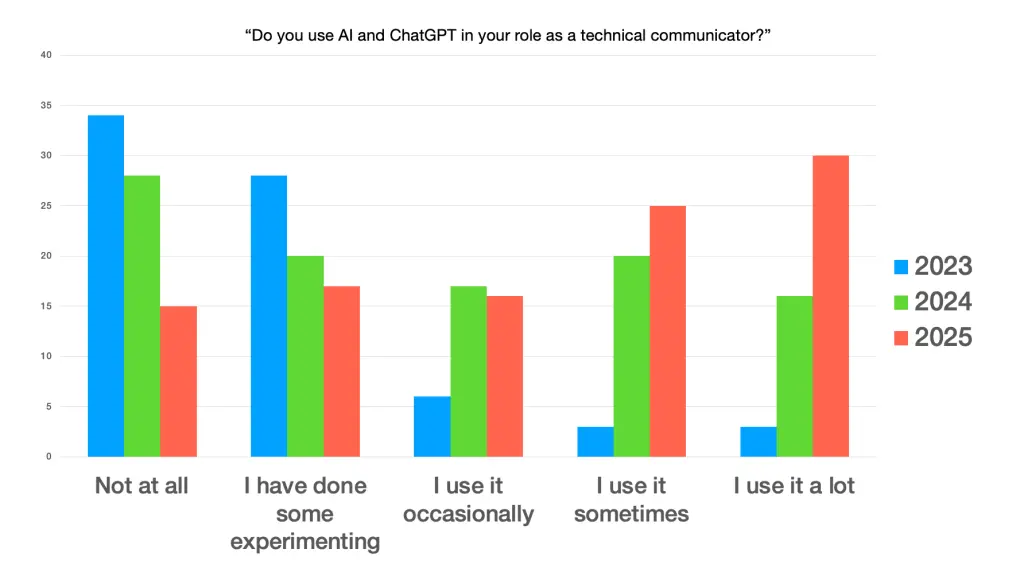
AI is reshaping technical writing roles toward higher-value work that combines strategy with specialised expertise. This doesn't eliminate technical writers; it changes what they spend time on.
From content creator to strategic orchestrator
Ellis Pratt (Cherryleaf) describes the role shifting toward orchestrating information ecosystems and optimising user success—not just producing documents.
In practice, this includes:
- Information architecture and content strategy
- Prompt engineering and AI orchestration
- Validation discipline and quality systems
- Analytics and metrics interpretation (what users search, where they fail)
- Stakeholder management and advocacy (getting time, access, and ownership)
Ferri-Benedetti frames a related concept: technical writers as context curators—people who shape the inputs so both humans and AI can reliably produce useful outputs.
Productivity gains and workflow transformation
Johnson has written that AI can substantially accelerate doc output when used with strong source inputs and good validation practices. The time saved tends to shift effort toward:
- Verification and testing
- Edge cases and troubleshooting
- Information architecture improvements
- Usability and clarity upgrades
- Strategic prioritization
Quality, governance, and validation in AI documentation
Establishing AI documentation policies
Ferri-Benedetti argues it's risky to wait for someone else to set the rules; instead, start drafting your policy and iterate.
Effective policies usually define:
- Approved tools and approved use cases
- Rules for sensitive data and confidentiality
- Required review levels by doc type (reference vs how-to vs safety-critical)
- Attribution/disclosure practices (if applicable)
- Quality standards and escalation paths
Quality control and validation practices
Essential practices include:
- Technical verification: test steps, examples, parameters, UI text
- Consistency checking: terminology and style guide enforcement (AI + linters)
- Completeness review: prerequisites, edge cases, warnings, limitations
- Usability validation: can real users complete tasks with the doc?
- Traceability: version control, review history, "last updated," ownership
Managing context and knowledge
Pratt highlights a risk with tools that "remember": they can carry bias and outdated context into new work. Good hygiene includes:
- Starting fresh contexts for new projects
- Pruning or resetting the tool memory when possible
- Treating old outputs as drafts that may now be outdated
Workflow automation around AI: opportunities and limits
Traditional automation is deterministic: the same input produces the same output. LLMs like ChatGPT work differently: they generate text probabilistically, so results can vary and should not be treated as self-verifying. In practice, the automation sits around the model (inputs, checks, routing, publishing), while the model supports drafting and refinement within that workflow.
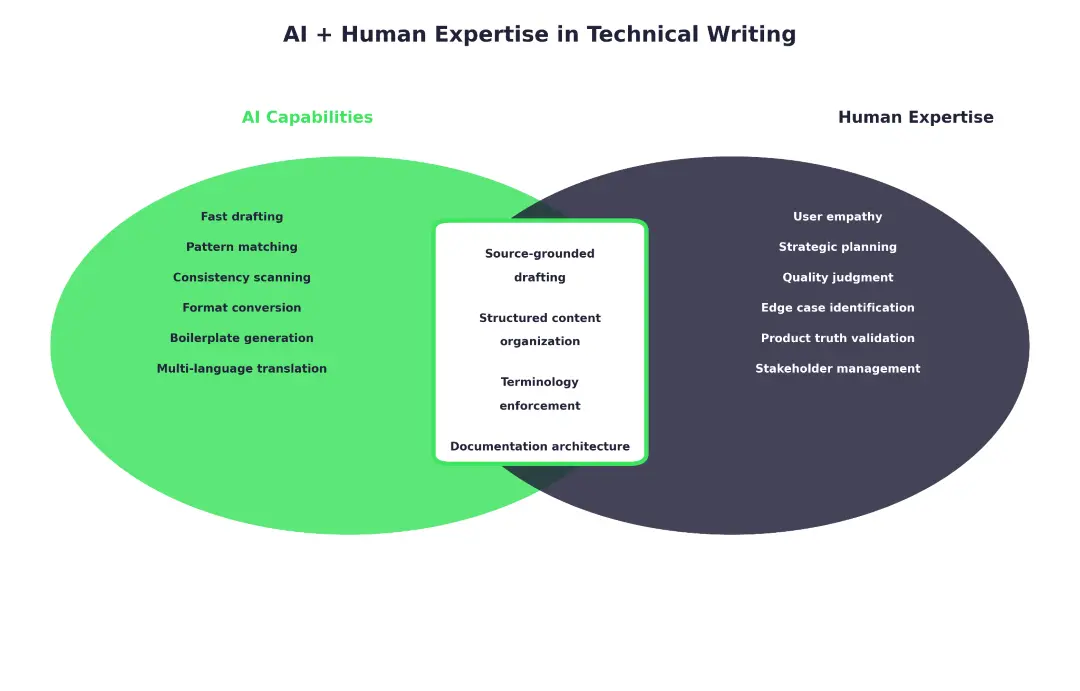
What workflow automation around AI handles well
- Structured reference docs (APIs, CLIs, config tables) from trusted inputs
- Boilerplate and templates (repeatable structures, standard sections)
- Format conversion and publishing (Markdown → HTML/PDF, docs builds)
- Consistency enforcement checks (style/terminology rules, linting, link checks)
- Update detection signals + task routing (diffs/spec/UI changes that trigger review)
Where human expertise remains essential
- Verification against the source of truth (product behaviour, code/specs, tested examples)
- Understanding user intent and pain points
- Explaining complex concepts clearly, including edge cases and "gotchas"
- Exposing implicit assumptions, prerequisites, and warnings
- Strategic planning and prioritisation
- Final quality judgment and accountability
A useful summary often attributed to Johnson: AI won't replace technical writers—writers who use AI well will replace those who don't.
Looking ahead: emerging trends in AI technical communication
A few grounded trends are becoming clearer:
- More context-aware systems that use retrieval over your approved knowledge base
- Tighter integration with dev workflows (docs updates triggered by specs/diffs)
- More domain-specific AI tuned for technical content and terminology
- Documentation as experience, not just pages: faster answers, better self-service, fewer support escalations
Even as tools improve, the principle remains: AI amplifies human expertise rather than replacing it.
A practical AI documentation workflow you can implement
This workflow is designed to maximise speed while protecting accuracy.
Step 1: Start with inputs, not prompts
As I, Ferry Vermeulen, the author of this article, usually put it: "Sh*t in, sh*t out." AI can only work with what you feed it. Strong source materials lead to strong drafts; vague context leads to generic filler.
- PRD/spec
- SME interviews
- Supplier's documentation
- UI labels and interface text
- OpenAPI/Swagger specs
- Diffs/changelogs
- Support issues and bug reports
- Style guide + approved terminology
- Related existing docs
Step 2: Use AI for structure before prose
Ask for:
- An outline for the target audience
- Required sections and warnings
- A list of assumptions and "NEEDS VERIFICATION" items
Step 3: Generate drafts in chunks
Work topic-by-topic (feature-by-feature), not whole manuals in one prompt.
Step 4: Validate rigorously
- Execute steps in the product
- Test code samples
- Verify UI labels, parameters, and error messages
- Confirm prerequisites and limitations
Step 5: Run consistency and style checks
Combine AI scans with tooling like style linters and terminology checks.
Step 6: Publish with traceability
Use version control, review history, "last updated," and ownership.
Step 7: Measure and iterate
Track:
- Searches with no results
- Support drivers and repeated failures
- Time-to-resolution for common tasks
- "Was this helpful" feedback and exits
- Coverage gaps vs product features
Reusable technical writing prompts
Prompt for user manual draft (AI user manual generator)
"Act as a technical writer. Create a user manual section for [feature] for [audience].
Use this source material (source of truth):
[paste spec, UI labels, constraints, requirements]
Include:
- Prerequisites
- Numbered steps (one action per step)
- Expected result
- Warnings/cautions
- Troubleshooting
- Known limitations
Before drafting, ask 5 clarifying questions if anything critical is missing."
Prompt for API endpoint documentation (AI for API documentation)
"Using this OpenAPI spec + engineering notes, draft documentation for [endpoint].
Include:
- Purpose
- Authentication
- Parameters table (name/type/required/description)
- Example request/response
- Error cases
- One common pitfall
Flag uncertainties as NEEDS VERIFICATION."
Prompt for consistency check across documentation (AI-generated documentation QA)
"Review these pages for:
- Terminology mismatches
- Inconsistent UI labels
- Contradictory instructions
- Missing prerequisites
- Formatting inconsistency
Output a numbered issues list with suggested fixes."
Prompt for troubleshooting decision tree
"Create a troubleshooting workflow for [problem] using these known causes/logs:
[paste symptoms, errors, fixes]
Output:
- A decision tree
- Recommended article structure
- Focus on self-diagnosis before contacting support."
Prompt for release notes from changes (documentation automation)
"Summarise these changes into end-user release notes:
[paste diffs/changes]
Organise by:
- New
- Improved
- Fixed
- Breaking changes
Avoid internal jargon, add user impact, and flag uncertainties."
Frequently asked questions about AI in technical writing
What are AI documentation tools?
AI documentation tools use AI (often LLMs) to support drafting, editing, consistency checking, translation, and content retrieval, integrated into documentation workflows with human oversight.
Can AI create technical documentation automatically?
AI can automate parts of the pipeline (boilerplate, formatting, drafts, consistency checks), but fully automated documentation without validation is risky in most real products.
Is ChatGPT good for technical writing?
Yes, for outlines, drafts, restructuring, and consistency checks—when you provide strong source material and treat outputs as drafts requiring verification.
What are AI documentation best practices?
Ground outputs in source-of-truth inputs, enforce structure, validate everything, use terminology/style checks, and adopt a clear AI usage policy.
How do AI user manual generators work?
They work best when fed structured product knowledge (feature inventory, UI labels, warnings, supported configurations, limitations). Without that, they produce plausible but unreliable manuals.
Will AI replace technical writers?
Roles are changing more than disappearing. Writers who can orchestrate tools, ensure quality, and design information experiences become even more valuable.
Conclusion: Navigating the AI-assisted future of technical writing
AI has moved from experimental novelty to a practical tool in technical writing. Adoption is already significant across the profession, and teams are learning that the real advantage comes from combining AI speed with strong inputs, clear structure, and rigorous validation.
 |
“AI is not replacing technical writers; it's amplifying their capabilities. By automating repetitive tasks, ensuring compliance, and enhancing consistency, AI allows writers to focus on higher-value work—crafting clear, user-centric documentation that enhances the customer experience. The future of technical writing is a hybrid model where AI and human expertise work together to create faster, smarter, and more accurate documentation.” - Ferry Vermeulen, founder at INSTRKTIV |